Alternatives to Email for Client Communication
The best alternatives to email for client communication include project management tools, messaging apps, client portals and video calls, and each one suits different needs. Email has long been the go-to tool for client communication. However, its limitations, such as cluttered inboxes, delayed responses, and lack of live interaction, have led many to seek more efficient alternatives. As businesses strive to enhance productivity and improve client relationships, exploring modern communication tools has become key. From instant messaging platforms to project management software, a variety of solutions now offer streamlined, collaborative, and personalized ways to connect with clients. This article looks at the most effective alternatives to email, examining their benefits and how they can transform the way businesses communicate in a digital-first world.
Five Ways to Talk to Clients Without Email, Including a Client Portal
Email has long been the go-to method for client communication, but it’s not always the most efficient or effective option. With the rise of digital tools and platforms, businesses now have a variety of alternatives to streamline communication, enhance collaboration, and improve client relationships. Below, we explore some of the best alternatives to email for client communication.
1. Project Management Tools
Project management tools like Trello, Asana, and Monday.com offer a centralized platform for communication, task management, and collaboration. These tools allow teams and clients to track progress, share files, and leave comments instantly. Unlike email, which can become cluttered, project management tools keep all communication organized and accessible.
| Tool | Key Features |
|---|---|
| Trello | Kanban boards, task assignments, file sharing |
| Asana | Task dependencies, timelines, team collaboration |
| Monday.com | Custom workflows, automation, integrations |
2. Instant Messaging Platforms
Instant messaging platforms such as Slack and Microsoft Teams provide a faster and more interactive way to communicate with clients. These platforms support up-to-date messaging, video calls, and file sharing, making them ideal for quick updates and discussions. Channels can be created for specific projects or topics, ensuring that conversations remain focused and organized.
| Platform | Key Features |
|---|---|
| Slack | Channels, integrations, searchable history |
| Microsoft Teams | Video conferencing, file storage, Office 365 integration |
3. Client Portals
Client portals are secure, web-based platforms designed specifically for client communication. Tools like Hiveage, Zoho Projects, and ClientPoint allow businesses to share documents, invoices, and updates in a secure environment. Clients can log in to access information, reducing the need for back-and-forth emails.
| Tool | Key Features |
|---|---|
| Hiveage | Invoicing, time tracking, expense management |
| Zoho Projects | Task management, Gantt charts, collaboration |
| ClientPoint | Document sharing, proposal management, analytics |
4. Video Conferencing Tools
For more personal and interactive communication, video conferencing tools like Zoom, Google Meet, and Webex are excellent alternatives to email. These platforms enable face-to-face meetings, screen sharing, and recording capabilities, making them ideal for presentations, brainstorming sessions, and client consultations.
| Tool | Key Features |
|---|---|
| Zoom | HD video, breakout rooms, recording |
| Google Meet | Integration with Google Workspace, live captions |
| Webex | Whiteboarding, AI-powered features, security |
5. Collaborative Document Editing Tools
Collaborative document editing tools such as Google Docs, Notion, and Dropbox Paper allow teams and clients to work on documents simultaneously. These tools eliminate the need for emailing multiple versions of a file and provide instant editing, comments, and version history features.
| Tool | Key Features |
|---|---|
| Google Docs | Live collaboration, comments, offline access |
| Notion | All-in-one workspace, templates, databases |
| Dropbox Paper | Task management, multimedia integration, sharing |
Client Communication Tools People Use Instead of Email
Instant Messaging Apps
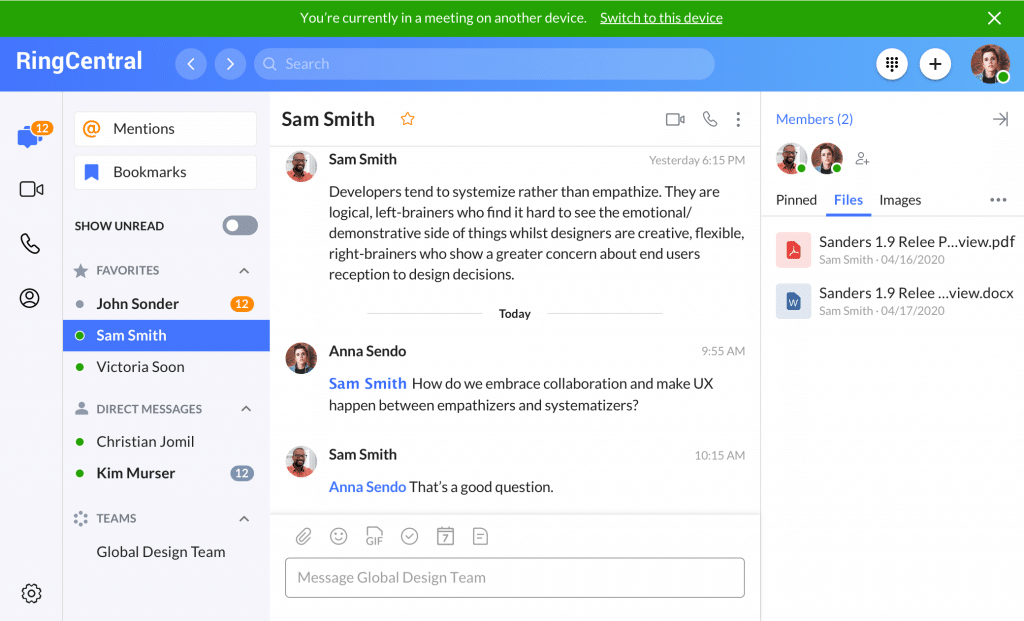
Instant messaging apps have become popular client communication tools and a common alternative to email for quick, up-to-date communication. These apps are widely used for both personal and professional purposes due to their convenience and speed. Some of the most commonly used instant messaging apps include:
- WhatsApp: A widely used app for text, voice, and video communication.
- Slack: Popular in workplaces for team collaboration and file sharing.
- Telegram: Known for its security features and group chat capabilities.
Collaboration Platforms
Collaboration platforms are increasingly replacing email for project management and team communication. These tools integrate messaging, file sharing, and task management into one platform. Key examples include:
- Microsoft Teams: Combines chat, video meetings, and file collaboration.
- Google Workspace: Offers tools like Google Chat and Google Meet for smooth communication.
- Trello: Focuses on task management and team coordination.
Social Media Messaging
Social media platforms have integrated messaging features that serve as alternatives to email. These platforms are particularly useful for informal communication and networking. Notable options include:
- Facebook Messenger: Allows users to send messages, make calls, and share media.
- LinkedIn Messaging: Ideal for professional networking and communication.
- Instagram Direct: Used for quick and visual communication.
Video Conferencing Tools
Video conferencing tools are often used instead of email for meetings and presentations. These tools provide a more interactive and engaging way to communicate. Popular choices include:
- Zoom: Widely used for virtual meetings and webinars.
- Google Meet: Integrated with Google Workspace for easy scheduling.
- Microsoft Teams: Offers video conferencing alongside chat and file sharing.
Cloud-Based File Sharing Services
Cloud-based file sharing services are replacing email attachments for sharing large files and documents. These services provide secure and efficient ways to collaborate. Examples include:
- Google Drive: Allows users to store and share files with ease.
- Dropbox: Known for its simplicity and integration with other tools.
- OneDrive: Integrated with Microsoft Office for smooth collaboration.
What Is Replacing Email? Top Alternatives to Email Communication

Instant Messaging Platforms
Instant messaging platforms are increasingly replacing email for quick and informal communication. These platforms offer instant interaction, which is more efficient for immediate responses. Key features include:
- Live communication: Messages are delivered and read instantly.
- Group chats: Allows multiple users to communicate simultaneously.
- File sharing: Easy sharing of documents, images, and videos.
Collaboration Tools
Collaboration tools are becoming a popular alternative to email, especially in professional settings. These tools integrate various functionalities that streamline teamwork. Key features include:
- Project management: Tools like Trello and Asana help in tracking tasks and deadlines.
- Document collaboration: Platforms like Google Docs allow multiple users to edit documents as it happens.
- Communication channels: Slack and Microsoft Teams offer dedicated channels for different topics or projects.
Social Media Messaging
Social media messaging is another alternative to email, particularly for personal and marketing communications. These platforms are widely used due to their accessibility and user-friendly interfaces. Key features include:
- Direct messaging: Users can send private messages to individuals or groups.
- Broadcast features: Businesses can send updates and promotions to a large audience.
- Integration with other apps: Many social media platforms integrate with other services for easy communication.
Video Conferencing Tools
Video conferencing tools are replacing email for meetings and discussions, offering a more interactive experience. These tools are important for remote work and virtual meetings. Key features include:
- Face-to-face interaction: Enhances communication with visual cues and body language.
- Screen sharing: Allows participants to share their screens for presentations or demonstrations.
- Recording options: Meetings can be recorded for future reference.
Cloud-Based Communication Platforms
Cloud-based communication platforms are increasingly used as an alternative to email, providing a centralized hub for all client communication needs. These platforms are scalable and accessible from anywhere. Key features include:
- Unified communication: Combines email, chat, video, and voice in one platform.
- Accessibility: Can be accessed from any device with an internet connection.
- Security: Offers advanced security features to protect sensitive information.
Is There a Professional Way to Handle Email in Client Communication?

What Are the Key Elements of Professional Email Communication?
Professional email communication requires attention to detail and adherence to certain standards. Here are the key elements:
- Clear Subject Line: Ensure the subject line is concise and reflects the email’s purpose.
- Proper Greeting: Use appropriate salutations like Dear [Name] or Hello [Name].
- Concise Content: Keep the message brief and to the point, avoiding unnecessary details.
- Professional Tone: Maintain a formal and respectful tone throughout the email.
- Correct Grammar and Spelling: Proofread to eliminate errors and ensure clarity.
How to Structure a Professional Email?
Structuring an email professionally ensures clarity and professionalism. Follow these steps:
- Start with a brief introduction or reference to the purpose of the email.
- Body: Present the main content in short paragraphs or bullet points for readability.
- Call to Action: Clearly state what you expect from the recipient, such as a reply or action.
- Closing: Use a polite closing phrase like Best regards or Sincerely.
- Signature: Include your full name, job title, and contact information.
What Are Common Mistakes to Avoid in Professional Emails?
To maintain professionalism, avoid these common mistakes:
- Overloading Information: Avoid lengthy emails; stick to the main points.
- Using Informal Language: Refrain from slang, emojis, or overly casual phrases.
- Ignoring Proofreading: Always check for typos and grammatical errors.
- Forgetting Attachments: Double-check if you mentioned attaching files.
- Delayed Responses: Reply promptly to maintain professionalism and respect.
How to Manage Email Tone and Etiquette?
Managing tone and etiquette is important for effective communication. Consider these tips:
- Be Polite: Use phrases like please and thank you to show respect.
- Avoid Caps Lock: Writing in all caps can come across as shouting.
- Use Positive Language: Frame requests or feedback constructively.
- Respect Time Zones: Be mindful of the recipient’s time when sending emails.
- Respond Appropriately: Tailor your response to the context and recipient.
What Tools Can Enhance Professional Email Communication?
Several tools can improve the quality and efficiency of email communication:
- Email Templates: Use pre-written templates for common scenarios to save time.
- Grammar Checkers: Tools like Grammarly help ensure error-free writing.
- Email Scheduling: Schedule emails to be sent at optimal times.
- Signature Generators: Create professional email signatures effortlessly.
- Task Management Integrations: Link emails to task management tools for better follow-ups.
How Do People Communicate Besides Texting? Client Communication Methods

Face-to-Face Communication
Face-to-face communication remains one of the most effective ways to interact. It allows for immediate feedback and the use of non-verbal cues such as facial expressions, gestures, and tone of voice. This method is particularly useful in personal and professional settings where clarity and emotional connection are basic.
- Non-verbal cues like eye contact and body language enhance understanding.
- Immediate feedback helps resolve misunderstandings quickly.
- Builds stronger relationships through personal interaction.
Phone Calls
Phone calls provide a direct and personal way to communicate without the need for physical presence. They are ideal for quick updates, detailed discussions, or when emotional tone is important. Unlike texting, phone calls allow for up-to-date conversation and can convey urgency or importance more effectively.
- Instant conversation enables instant clarification.
- Conveys emotional tone more effectively than text.
- Suitable for urgent or important matters.
Video Calls
Video calls combine the benefits of face-to-face communication and phone calls. They allow participants to see each other, making it easier to interpret non-verbal signals and maintain a personal connection. This method is widely used for remote work, virtual meetings, and staying in touch with loved ones.
- Enables visual interaction, enhancing understanding.
- Supports non-verbal signals like facial expressions.
- Ideal for remote collaboration and personal connections.
Email Communication
Email is a formal and structured way to communicate, especially in professional settings. It allows for detailed messages, attachments, and the ability to reach multiple recipients simultaneously. Emails are useful for documenting conversations and providing a written record of communication.
- Provides a written record for documenting conversations.
- Allows for detailed messages and attachments.
- Suitable for formal and professional communication.
Social Media and Messaging Apps
Social media platforms and messaging apps offer a versatile way to communicate through text, voice, images, and videos. They are convenient for staying connected with friends, family, and colleagues, and often include features like group chats and multimedia sharing.
- Supports multimedia communication (text, voice, images, videos).
- Facilitates group chats and community interaction.
- Convenient for casual and informal communication.
Alternatives to Email FAQ
What are the best alternatives to email for client communication?
There are several effective alternatives to email for client communication, depending on your needs. Instant messaging platforms like Slack or Microsoft Teams allow for live conversations and collaboration. Project management tools such as Asana or Trello provide a structured way to communicate and track progress. For more formal interactions, video conferencing tools like Zoom or Google Meet can be used to hold virtual meetings. Additionally, customer relationship management (CRM) systems like HubSpot or Salesforce offer integrated communication features tailored for client interactions.
How do instant messaging platforms compare to email for client communication?
Instant messaging platforms offer faster and more dynamic communication compared to email. They allow for up-to-date conversations, which can significantly reduce response times and improve collaboration. Unlike email, which can feel formal and delayed, instant messaging fosters a more casual and interactive environment. However, it’s important to note that instant messaging may not be suitable for long-form or highly detailed communications, where email might still be the better option.
Can project management tools replace email for client communication?
Project management tools can partially or fully replace email for client communication, especially when working on collaborative projects. These tools provide a centralized platform where all communication, tasks, and updates can be tracked in one place. This reduces the need for back-and-forth emails and ensures that everyone is on the same page. However, for one-off or non-project-related communications, email might still be more appropriate.
What are the advantages of using video conferencing for client communication?
Video conferencing offers a personal and engaging way to communicate with clients, especially when face-to-face meetings are not possible. It allows for visual cues and instant interaction, which can help build stronger relationships and clarify complex topics more effectively than email. Additionally, video conferencing can be used for presentations, brainstorming sessions, or collaborative discussions, making it a versatile tool for client communication. However, it requires scheduling and may not be as convenient for quick updates or asynchronous communication.